
Text Storage
Text Storage
When you talk to someone or something when you have Storage active, their text is stored, they freeze and are unable to be spoken to again, and the next thing you speak to reads off the stored text. Some characters will only say part of it, and either cut it off, or say their own text after a single box of the stored text. This can result in some humorous results, such as the King of Red Lions talking about how fine he looks, or the Tingle Tuner telling you not to touch it with filthy hands.
What makes text storage very useful is that: if you get storage, perform text storage and then exit that object's stored text box, you can simply interact with it again to re-store its text--meaning that you don't have to get storage again. This is because closing a textbox while having control over Link gives you Storage, making this another way to get Storage, and to chains Storages together.
Using Text Storage to Interrupt Cutscenes
In addition to talking to another character, sign, etc. to bring up the stored text, you can also bring up the stored text by pulling out the Wind Waker. When you exit out of the stored text box while interacting with another animation (such as opening a chest or opening a door) that animation will be cut-off early.
The difference between this and simply interacting with a cutscene with storage is that with text storage you can chose when during the cutscene you want to get storage, instead of being forced to start the cutscene immediately with storage. As an example, simply interacting with a door with storage on the overworld will setup a door teleport, while interrupting opening a door in the middle of the animation with text storage will cause door cancel.
Double Storage
Discovered by GlitchesandStuff
With the increased usage of superswimming to cross the overworld map due to the discovery of dry storage, special care has to be taken with some islands that have entry cutscenes (such as Forest Haven, Greatfish, and the 2nd visit to Outset to retrieve Nayru's Pearl). This is because if you enter these cutscenes with camera lock active, your game will softlock, as camera lock prevents the cutscene from executing correctly. However, there is a way to get around this by using text storage.
Get storage once, then store a textbox. Get storage again and make sure that textbox has popped back up while you're walking around. Now pull out the Wind Waker to lock the camera. From here it is fine to close the stored text. This gives you storage while in camera lock. Now when you hit the entry cutscene trigger, you will store the cutscene and avoid the soft lock.
Double Storage can also be used to superswim to an island with a chest, and use the storage to store opening the chest to get Chest Storage. You will still have camera lock so you will be able to superswim away with chest storage. This is useful for chests that don't have a nearby dry storage spot, such as Crescent Moon Island when you don't have bombs.
If you wish to have both storage and text stored, but NOT have the textbox appear on screen yet, you can: get storage, store a textbox, then get storage with a 1 frame wind waker dive. Events that only last one frame don't make text appear.
Notes: Double Storage does NOT mean that you have two storages. It is a term used to indicate that you have storage while in the camera lock state.
Delayed Storage
Discovered by TrogWW
Some NPCs have the property that you can't progress through their texts if you don't have the camera looking at them. These NPCs can be used to delay activating Storage.
To do so, get storage and then store the NPC's dialogue, then pull out the wind waker to progress through the textboxes and close it. If you don't look at the NPCs when you close the textbox, you won't have storage, but will get storage as soon as you look at them.
This technique can be used for an easier method of Double Storage on crowded islands such as Windfall. This can also be used in order to start a superswim after fishing up a treasure in the ocean without having to sail back to the island to get dry storage.
Pausing During Text Storage
It can sometimes be useful to be able to pause while having text stored, for example in order to allow pausing during Fake Death, to make it easier to execute. There are a couple ways to do this.
With Picto Transition Interacting
Normally, you cannot pause while having text stored. However, when storing a textbox as you fade out of being in the Picto Box (see Picto Transition Interacting), the game delays creating the text instance until the next event happens, allowing you to pause while having this text stored.
Because this does not require a transition to the album menu for it to work with KoRL, it can also be performed with the Telescope instead of the Picto Box.
With One Frame Wind Waker Dive & KoRL
If you have not activated an event longer than a frame prior to storing the King of Red Lion's text since your last loading, then the game will delay creating the text instance until the next event happens, allowing you to pause while having this text stored. Thus, if you perform a wind waker dive that's only one frame long, you can store KoRL's text and still be able to pause. This does not work with NPCs.
Note that entering an area through an animation (like opening a door) will make it impossible to perform this technique.
Text Stacking
Discovered by legendoflinkk
Description
Combining the fact that NPCs dialogues can't be created if they are not on screen (see Delayed Storage) and the Picto Transition Interacting glitch to delay the textbox actor creation, it is possible to stack several textboxes on top of each other which is normally impossible.
First, get storage. Then store a NPC textbox using the picto transition, by first going into the pictobox near the NPC, then in quick succession press R to go to the album, B to close the pictobox during the album transition, and A to talk to the NPC. If done right, you will hear the textbox getting stored but you will still be on the album screen. Now press R again to go back to gameplay, while making sure the NPC never gets loaded from being in camera view (you can chain frame perfect R presses to help if this isn't possible in one R press). If the steps have all been done right, the NPC textbox will have been stored, but the proc_msg actor instance from the textbox will not have been created yet.
Once the first textbox has been stored without the instance being created, repeat this process while making sure never to look at the first NPC: get storage, go close to a different NPC, go into the pictobox, perform the picto transition interacting glitch, then move away without looking at neither of the NPCs. You will now have two proc_msg instances waiting to be created. If you wish you can even stack more textboxes.
To perform Text Stacking, first pull out the wind waker to make sure all the textboxes are ready to appear (even the text from the last npc). Then you will need to get both NPC in camera view on the same frame. This can for example be done by having your back face both NPCs then pulling out the wind waker to have them both enter camera view together. This will create both proc_msg instances in the DYN heap at the same time, which is normally impossible, as there can normally never be more than one textbox on screen at a time. This state is highly unstable and can easily crash the game because the game will have trouble deleting both messages safely.
Through the same principle as Delayed Storage, you can decide to look at none, one or both NPCs at once while advancing textboxes, which means you can decide to attempt to close both textboxes together or separately, and in the order you choose. When creating each textbox, the game creates a J2DScreen in the FopMsg heap. After both closing the first textbox and looking at the corresponding NPC, which call the function causing the deletion of its proc_msg instance and J2DScreen, some pointers related to that instance will be dangling. This pointer is not nulled out, and by both closing the second textbox afterwards (which can sometimes be invisible) and looking at the other NPC, the game will attempt to free the same J2DScreen again, which is a double free and will usually crash. This glitch allows Arbitrary Code Execution (ACE).
You can also avoid the crash by storing another NPC textbox inbetween closing both textboxes. This will set the pointer to a valid region in memory again and can be used to clear all proc_msg actors safely.
Arbitrary Code Execution (ACE)
This application has its own wiki page. See Arbitrary Code Execution.
Other Text Stacking Methods
With 1 Storage
After storing the first textbox with the Picto Transition glitch, move away from the NPCs while frame perfectly chaining R presses. If you have a NPC in camera view and talk to another NPC during the last picto transition, you will have also stacked two textboxes. However you won't have control over Link.
With Door Textboxes
Store the bomb house door text. Get the text to appear, then get storage again and store opening the Lenzo door (before unlocking it) to store that doors text as well. You can now talk to npcs and make dialogues appear. Every dialogue will now be replaced by the bomb house door text and the lenzo door text stacking on top of themselves a lot.
After performing this glitch even once, the game will crash if you attempt to load a different area.
Video Example using a wind's requiem storage alternate method
This method works by abusing the fact that storing these door texts (like the bomb house door text and the lenzo door text) have strange properties that make them appear over and over again if they're stored. The order in which these textboxes are stored doesn't matter.
Text Cancel
Discovered by Otnert
How To
Text Cancel is a state in which the next textbox Link interacts with will be unable to appear. It happens when the game thinks you have text stored, except you don't have one. This replaces the next textbox you interact with with nothing, cancelling the textbox alltogether.
There are multiple ways to trigger this glitch. The easiest and most useful way to trigger it is to store a sign (storing a sign will still make the sign text appear on screen immediately contrarely to storing any other text, and you still have control over your movement). Simply close the sign textbox while you have control over Link to get Text Cancel. There are however a few other ways to trigger it: you can cancel a song at the correct time so that the blue textbox saying "you've played x song" disappears, but the effect of the song doesn't activate; or you can interrupt pulling out the sail after the textbox appears. In short, closing any textbox that doesn't have the property of giving you Storage usually gives you Text Cancel instead.
Once you've cancelled a textbox with this glitch, Link goes back into a normal playable state, except with the mMode of the message stuck to the value 18 which will cancel the next triggered textbox.
There are several ways to cancel playing a song:
- You can play any song with storage and hit yourself with a Tingle Bomb (or any damage source) at the correct time to cancel the song. You will now have Text Cancel.
- You can play any song with storage and then call Tingle ("Heyyy!") at the correct time.
- You can use Wind's Requiem Storage to cancel the song. Get storage, store a textbox, then play the Wind's Requiem as you get storage from a wind waker dive. Close the textbox and then, after the song ends but before the Wind's Requiem prompt appears, pull out the wind waker and play any song. Choose a wind direction at the correct time around the end of the song to cancel the song playing with the wind's requiem prompt. You now have Text Cancel.
To cancel pulling out the sail, you can use wind's requiem storage as well. The sail text is a textbox that disappears on its own so it will also grant you Text Cancel.
While this doesn't have too many uses, this glitch also comes with a theory: if this could be performed inside Fairy Fountains, this would allow a glitch called Great Fairy Item Manipulation, as skipping the great fairy textbox skips the item id update and the fairy will give Link the last item obtained again. However, there is currently no known way to obtain Text Cancel in these areas.
Explanation
Explained by TrogWW
Here is the pseudocode for when an actor requests to create a new message: i_msgId is a statically defined value that the message function uses.
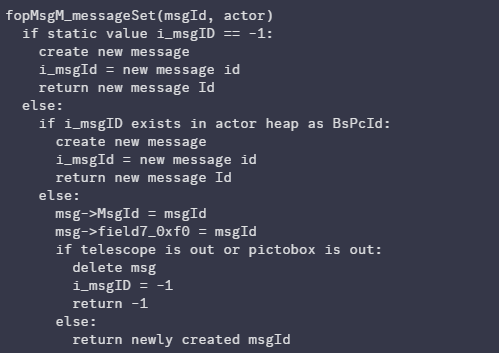
For Text Cancel, what ends up happening is the following:
- Store the sign, a proc_msg2 is created, i_msgId is set to the id of the message actor
- Close the sign textbox, this does NOT remove the proc_msg2 from the heap but sets the mMode for the message to 18
- Interact with a different actor, that actor requests to make a new message and calls fopMsgM_messageSet
- fopMsgM_messageSet sees i_msgId has a value, and that the message actor is still in the heap. Instead of creating a new actor, it passes the existing one back to that most recent actor
- That actor sees the proc_msg2 it got back has an mMode of 18, signaling that it should be closed. And the text box immediately terminates.
As a side note, we can see that there is a check for the pictobox/telescope. If either of these are out then it deletes the existing message.
Stale Message Storage
Discovered by TrogWW
The game checks a value called the action type to know if Link is currently in an event or not. This action type is 3 during the action event, and 2 outside of one (in action hunt). By closing textboxes in a specific glitched way, the textbox will close in such a way that the game still believes it is in the action event despite no textbox being on screen anymore and having control of Link again. To know when an event is supposed to end, the game is looking at the mMode value to be equal to 18 in the message actor, and when it is the game will attempt to end the event, giving us storage. However, because the proc_msg actor was deleted already by closing the textbox, the message pointer is now stale in memory, and this mMode value can be manipulated to become 18 through other means, by manipulating the heap to our advantage.
To initiate this glitch, store a textbox and bring it on the screen. Then pull out the sail (or any item that Link can hold over his head for that matter) then close the textbox. This will close the textbox in the necessary way. Another method is by closing a textbox at the same time as you interact with another actor, closing the first textbox and interrupting the actor before their textbox even appears on screen.
While most textboxes will give storage when the mMode value becomes 18, most of them won't be able to completely cancel events alltogether this way, and will instead wait for the event to end before giving storage, making this less useful. The textboxes that are able to cancel events all together are the same as the ones that allow Door Cancel:
- Sturgeon's text during the intro
- The Windfall Windmill sign text
- The pirate ship password text
- Most stone tablet, song stone and wind's requiem pad textboxes in the game (tag_msg actors)
- Gossip stone hint triggers
- Door textboxes (Bomb shop, Lenzo's Upper Door, Cabana, Grasscutter's House at day, Windfall bar during endless night)
This glitch is used in order to perform Zephos Skip.
Note: Most actors get their message pointer from a static reference within the actors REL file. This is the pointer that gets stale and reads from a bad section of memory. KoRL, however, constantly updates his msg by looking into the actor table for a matching message Id. This means this glitch unfortunately cannot be performed with KoRL's textboxes.
KoRL Auto-Sail Storage
Discovered by Legendoflinkk
By sailing into an area where you are normally not allowed to sail with KoRL with storage, you can store the KoRL textbox saying that you're not allowed to be here. By pulling the wind waker and closing the textbox with B, you can have control over Link during the KoRL auto-sailing away cutscene. When this cutscene ends, any event is cancelled. This is a very powerful cutscene cancel effect, capable of even getting door cancel, which can have some uses to due being delayed and not requiring any input as the cutscene just ends when KoRL is back somewhere he's allowed to sail.
This could potentially be used to skip the TotG Rising Cutscene, if it were not for the fact that farore's pearl is needed to raise TotG, and with farore's pearl Link is allowed to sail in most of the ocean.
NPC Animation Transfer
Which animation a NPC does while talking is found as a parameter inside the textbox itself. So if you store a textbox from one NPC then talk to another one, you can get the second NPC to play the animation with the id of the first NPC animation that is normally played for that textbox. This can have funny results, such as getting Rito characters to fly mid-dialogue, Sam to stand up from his bench, or Zunari removing his hood.
There is one known instance of this glitch causing a crash. Storing the text from Abe during the prologue on Outset then talking to Sue-Belle crashes the game.