Version Differences
There are several different versions of the "N64" release of Ocarina of Time. While most changes made from version to version won't affect normal gameplay, there are some glitches exclusive to versions that do affect play at the higher level. There are also a handful of graphical modifications between the versions.
Despite the common belief that the N64 versions were released over time, the debug screen build dates show that all versions of Ocarina of Time released for the N64 were made before the game's first retail release.
Builds
The NTSC region builds target Japan and North America. NTSC version contain localization for both the Japanese and and the US "versions" of the game. A common misconception is that the US and Japanese versions are different, when in fact they are identical save for a single byte used to determine what language the game runs in.
The PAL region builds target Europe. PAL versions are translated into English, French, and German. In order to conform with the PAL standard the game runs at a slower target speed of 50hz rather than 60hz. This change results in physics and timing quirks that drastically alters a number of setups documented on this site.
The iQue builds target China/Hong Kong and are translated into Chinese.
| Region | Version | Build Date |
|---|
| NTSC | 1.0 | 98-10-21 04:56:31 |
| NTSC | 1.1 | 98-10-26 10:58:45 |
| PAL | 1.0 | 98-11-10 14:34:22 |
| NTSC | 1.2 | 98-11-12 18:17:03 |
| PAL | 1.1 | 98-11-18 17:36:49 |
| Japanese | Gamecube | 02-10-29 23:49:53 |
| Japanese | Master Quest | 02-10-30 00:15:15 |
| USA | Gamecube | 02-12-19 13:28:09 |
| USA | Master Quest | 02-12-19 14:05:42 |
| Europe | Master Quest Debug | 03-02-21 00:16:31 |
| Europe | Gamecube | 03-02-21 20:12:23 |
| Europe | Master Quest | 03-02-21 20:37:19 |
| Japanese | Gamecube (Zelda Collection) | 03-10-08 21:53:00 |
| Chinese | iQue | 03-10-22 16:23:19 |
| Chinese | iQue Traditional Chinese (unreleased) | 06-10-13 14:17:43 |
What Version Do I Have?
For NTSC/NTSC-J N64 cartridges, the easiest way of determining your version is to check the small punch-code at the top-right side of the back label.

*The x's represent random numbers
xx = 1.0
xxA = 1.1
xxB = 1.2
If your back label's punch-code is illegible, or you feel the cart may have been tampered with, you can always check the debug screen (scroll down to the bottom), or check for version-unique glitches/content seen further down this page.
Beyond this, it's also a good idea to keep in mind that:
- NTSC gold cartridges are almost always 1.0, but 1.1's are known to exist
- The rare "Not for Resale" labeled cartridge are always 1.0
- The standard grey NTSC cartridge usually contains 1.1 but can often contain 1.0 or 1.2 as well
- "Player's Choice" labeled cartridges are always 1.2
- PAL versions 1.0 and 1.1 are roughly equivalent to NTSC 1.2
- Virtual Console releases contain an unedited version of the NTSC 1.2 rom, or a very slightly modified PAL 1.1 rom, with modifications applied via the game's "WAD" (see below for more info on this)
- The Gamecube versions are their own specially compiled roms
8.The Chinese iQue release is likely based of the Gamecube versions
NTSC 1.0

This is the first Japanese/North American version of the game. 1.0 has many unique glitches that were corrected in the later versions.
Exclusive Content in 1.0:
- The rotating N64 logo upon boot-up is very bright
- You can quickly skip through Zelda's text boxes just before she gives you the Light Arrows
Exclusive Glitches in 1.0:
- The Master Sword is never restored to the B button after a savewarp, so Swordless Link is possible by savewarping out of the Ganon fight
- Can steal the fishing rod by casting while suspended in air via the hover boots, as well as by casting the moment before you jump off of a rock in the pond
- You can cast the rod near the door in the fishing pond to crash the game
- Can do empty bomb glitch to create collection delay or Quick Draw bombs
- The grave holes in Kakariko Graveyard force you to grab their edges/jump over them as Link tries to enter (whether you grab or jump over them depends on your approaching speed).
- Can do item input for one frame during Put Away animation, OI by putting away a full bottle, and use items inside a crawlspace or ladder or while pushing a block.
- Link has no putaway animation for the sword if he has it out and goes to climb a ladder or vines.
NTSC 1.1
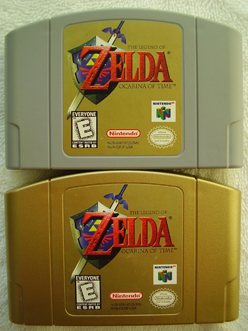
1.1 is the first update to Ocarina of Time. Many glitches were fixed along with some on-screen text issues and a very minor graphical change was made.
Changes in 1.1:
- Can no longer use items during Put Away animation.
- The rotating N64 logo upon boot-up has been darkened and looks glossier.
- The hover boots and rock-jump methods of stealing the fishing rod are fixed.
- You can no longer cast the rod near the door inside of the fishing pond.
- If you savewarp without the Master Sword in the inventory as Adult Link, it will be restored to the B button.
- Various text-box spelling and punctuation errors have been corrected.
- The empty bomb glitch is fixed.
- The edges of the grave holes in Kakariko Graveyard no longer force you to grab or jump over them as you try to enter.
- Zelda's text before the light arrows can no longer be skipped on the English version.
- Link now puts away any item in hand correctly when going to climb. This adds 4 extra frames to the climbing animation.
NTSC 1.2
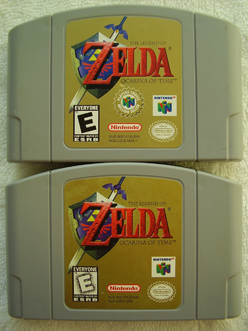
NTSC 1.2 is the second revision for the US/Japanese release of the game. This update corrects more text as well makes some notable graphical and sound changes to the game, censoring the blood as well as replacing a controversial song within one of its temples. It also fixes an item-receiving glitch.
Changes in 1.2:
All the changes that 1.1 made plus....
- Ganondorf's and Ganon's blood have been changed from red to green
- The Fire Temple theme song has been replaced with a remix of the Shadow Temple's theme
- Various text-box spelling and punctuation errors have been corrected
- Early eyeball frog and various collection delays have been fixed
- You can no longer skip the Bongo-Bongo cutscene by dropping a bomb down before the fight
NTSC GCN

The Gamecube releases are their own new builds of Ocarina of Time. They are similar to the NTSC 1.2 version aside from one of the game's controversial symbols being replaced. Due to emulation and the increase in hardware power however, some new tricks are available that once caused the game to crash on the N64. This version of the game can be found in the Zelda Collection (JPN) or Collector's Edition disc, or the Ocarina of Time and Master Quest disc.
Changes in 1.2 GCN:
All the changes to NTSC 1.2 made plus....
- The game resolution has doubled from 320 x 240 to 640 x 480
- The emulator relies on high level graphics emulation of the RCP to speed up emulation time at the cost of accuracy, resulting in the following quirks
- The crash debugger won't be displayed as the emulator writes to/displays it's own framebuffer
- You can use Deku Sticks on the B button as adult without crashing the game
- Morpha's ball is now white & red and has a different pattern
- The Get Item Manipulation glitch will work in situations where it would crash on N64
- The dungeon block's, Gerudo sign's, and Mirror Shield's crescent moon & star symbols have been replaced with the Gerudo symbol that was used in Majora's Mask
- Dropping a bombchu while out of bounds will no longer crash the game unless there is already an explosive in bounds
- Out of bounds explosions are doubled on the GCN version, allowing you to hover easily
- There is significantly less lag overall, especially during the Tower Escape and Ganon fight
- Code required to interface with the Nintendo 64's Disk Drive add-on has been removed
- The crash debugger contains a glitch where a null pointer is dereferenced, causing the crash debugger itself to crash and always display a red bar error
iQue
Changes in the iQue version
- The game seems to have less free memory available for allocating actors, making certain actors more likely to fail to spawn
- The crash debugger likely contains the same glitch seen in the Gamecube version where a null pointer is dereferenced, causing the crash debugger itself to crash and always display a red bar error.
Virtual Console
The NTSC Virtual Console releases of Ocarina of Time contain an unedited NTSC 1.2 rom, while the PAL Virtual Console releases contain a nearly unedited PAL 1.1 rom, the only edit being a minor hex edit to change a small bit of dialog in one of the languages. Changes to these versions are either caused by inaccuracies in emulation, or by "hacks" that are injected by the wad file that contains the emulator code.
Changes in the Virtual Console release:
All the changes to NTSC 1.2 made plus....
- The game resolution has doubled from 320 x 240 to 640 x 480
- The emulator relies on high level graphics emulation of the RCP to speed up emulation time at the cost of accuracy, resulting in the following quirks
- The crash debugger won't be displayed as the emulator writes to/displays it's own framebuffer
- You can use Deku Sticks on the B button as adult without crashing the game
- Morpha's ball is now white & red and has a different pattern
- The Get Item Manipulation glitch will work in situations where it would crash on N64
- The dungeon block's, Gerudo sign's, and Mirror Shield's crescent moon & star symbols have been replaced with the Gerudo symbol that was used in Majora's Mask
- Dropping a bombchu while out of bounds will no longer crash the game unless there is already an explosive in bounds
- There is significantly less lag overall, especially during the Tower Escape and Ganon fight
Another notable change is that the Wii U Virtual Console's high level graphics emulation was made more robust by opting to stop processing invalid display lists.
Content Changes
Rotating N64 Logo

In v1.1 and onward, the rotating N64 logo that appears when you boot the game has been made significantly darker and glossier. The background behind this one is a complete mystery, but the reasoning for its alteration is obvious... the v1.1 logo's colors are much truer to the commercialized N64 logo.
Ganondorf/Ganon's Blood
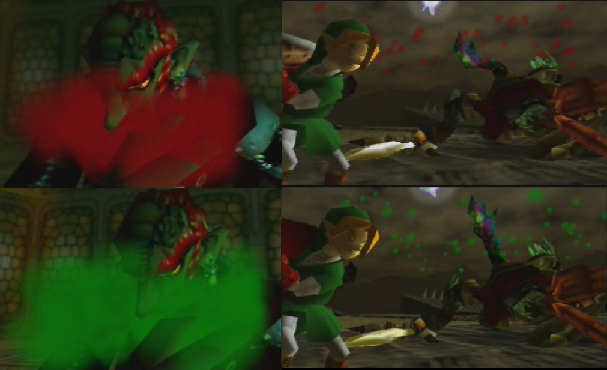
In NTSC 1.2 and onward, Ganondorf & Ganon's blood was changed from red to green. This was probably done to maintain an "E for Everyone" ESRB Rating.
Morpha's Ball

On the N64 system, Morpha's ball is rendered in a aqua-blue & red color with a distinct pattern. On GCN/VC Morpha's ball is white & red with a completely different pattern. This is a graphical rendering difference most likely due to an unsupported shader graphic, NOT an edit to the game (if you play any version of the game on emulator Morpha's ball will be white & red). In the re-textured 3DS version the ball continues to use the white & red color scheme.
Fire Temple Song
In NTSC versions 1.0 & 1.1, the Fire Temple song contains religious-themed vocals from the Muslim faith. One line, translated into English, states: "I bear witness that there is no god but Allah". In NTSC 1.2 and onward the song was replaced with what seems to be a remix of the Shadow Temple's song. This new song contains no discernible lyrics, only Gregorian-style moans and a ghostly female chorus can be heard.
Symbol Change

In all N64 versions a crescent moon & star symbol is present on the mirror shield, dungeon blocks, floor switches, and Gerudo signs in the game. In the Gamecube version and onward, this symbol was replaced with the diamond-shaped Gerudo symbol that was used in Majora's Mask. The symbol was most likely swapped-out because of its striking resemblance to the symbol of Islam. Obviously, having the bad-guys of the game represented by this symbol was in poor taste (as was having to physically step on the symbol countless times throughout the game). It's worth noting that the editors neglected to replace the old symbols in the beginning and ending rooms of the Dampe grave race until the 3DS release which substituted them with floral engravings.

